


.png?width=20&height=20&name=Vector%20(22).png)









.png?width=15&height=22&name=Logo%20(3).png)
.png?width=17&height=22&name=path4213_1_%20(1).png)


.png?width=15&height=16&name=Vector%20(18).png)
.png?width=17&height=17&name=Vector%20(19).png)
.png?width=15&height=15&name=Vector%20(17).png)
.png?width=17&height=17&name=Vector%20(20).png)


Shipping a mobile app in one language is hard enough. Shipping it in ten — while keeping pace with a regular release cycle, a growing feature set, and users across a dozen time zones — is a different problem entirely.
This guide covers how to localize a mobile app from an engineering perspective: the technical foundation, the workflow decisions, the iOS and Android differences that actually matter, and the failure modes that catch teams off guard. Whether you're building localization in from the start or retrofitting an existing app, the goal here is to give you a clear picture of what the work actually involves.
Internationalisation first, localisation second
Before localisation happens, the app itself needs to be built in the righ way to support it. This is the distinction between internationalisation and localisation — two terms that get used interchangeably but mean different things in practice.
Internationalisation (i18n) is the engineering work. It's how you structure your codebase so that text, dates, currencies, and layouts aren't hardcoded for a single language. Every string your users see needs to be externalised — pulled out of the code and into a resource file or string catalogue that can be swapped out per locale.
- On iOS:
.stringsand.stringsdictfiles, or the newer.xcstringsString Catalogs introduced in Xcode 15 - On Android:
strings.xmlfiles organised by locale in theres/valuesdirectory
Teams that skip proper i18n and jump straight to translation usually have to go back and refactor. It's significantly cheaper to build with localisation in mind from the start.
Localisation (l10n) is what happens after. It's the translation, the cultural adaptation, the date formats, the currency symbols, the decisions about tone and formality for each market. It's what makes an internationalised app feel native to a specific market — not just technically functional, but right.
Mobile-specific technical considerations
Mobile app localisation has characteristics that don't exist in the same way on web. Understanding them before you build your workflow prevents expensive rework.
Character limits and text expansion
UI elements have fixed space. A string that fits cleanly in English can run 30–40% longer in German, 20–30% longer in French, and shorter in Japanese or Korean. When a translated string overflows a button, a tab bar item, or a navigation label, it either truncates silently or breaks the layout — both of which surface as bugs in QA, caught late and fixed expensively.
The fix isn't to review strings after translation. It's to define character limits per string before translation starts, communicate them to translators as part of the job brief, and use pseudolocalisation during development to test expansion before real translations exist.
Pseudolocalisation replaces source strings with synthetic variants that simulate expansion and use accented characters. Running your app in a pseudolocalised state exposes layout problems early, when they're cheap to fix.
Pluralisation
Most engineers writing their first localised app underestimate this. In English, plural forms are simple: one item, two items. In Russian, there are four distinct forms depending on the number. In Arabic, there are six. Polish has different rules again. If your app displays any counts — notifications, files, items in a cart, days remaining — and your pluralisation handling is just appending an "s", it will be wrong in most languages you localise into.
Both iOS and Android have native mechanisms for this. On Android, strings.xml supports <plurals> with quantity attributes:
<plurals name="notification_count"> <item quantity="one">%d notification</item> <item quantity="other">%d notifications</item> </plurals> For a language like Russian, translators need to be able to provide all applicable plural forms — which requires your string format to support it from the start. The ICU Message Format handles this more flexibly across platforms and is worth adopting if you're managing a complex string library.
On iOS, .stringsdict files handle pluralisation rules per locale. The newer .xcstrings String Catalog format in Xcode 15 consolidates this with a cleaner interface.
Right-to-left layouts
RTL support is a layout engineering problem, not a translation one. Arabic, Hebrew, and Farsi all read right-to-left, which means navigation direction, button placement, icon mirroring, and the overall spatial logic of your UI need to reverse.
On Android, using start/end instead of left/right in layout attributes handles most of this automatically. On iOS, leading/trailing constraints in Auto Layout do the same. If your layouts use hardcoded directional values, RTL will require manual overrides for every affected view.
Test RTL early by enabling a right-to-left pseudolanguage. On iOS: Scheme > Options > Application Language > Right to Left Pseudolanguage. On Android: add android:supportsRtl="true" to your manifest and test with a forced RTL locale.
App Store and Google Play listings
Your store listing is localised content indexed for search within each market. Untranslated listings don't just create a poor impression — they suppress discoverability, because both stores use listing metadata to determine which search queries your app appears for.
Both stores support localisation of: app name, subtitle (App Store) or short description (Google Play), full description, keywords (App Store — 100-character limit per locale), and screenshots.
Keywords on the App Store are not translatable — they're market-specific. Translating your English keywords word-for-word will miss most of the actual search volume in that market. Treat keyword selection as fresh research per locale, not translation of the source.
If you're managing store metadata as part of a CI/CD pipeline, Fastlane's deliver action supports localised metadata via directory structure:
fastlane/metadata/ en-US/ name.txt description.txt keywords.txt de-DE/ name.txt description.txt keywords.txt This makes store metadata version-controllable, reviewable in pull requests, and deployable alongside your app.

iOS vs Android: what's actually different
Both platforms support localisation natively, but the implementation diverges enough to treat them separately — especially if you're building for both.
| iOS | Android | |
|---|---|---|
| String format | .strings, .stringsdict, .xcstrings |
strings.xml in res/values-[locale]/ |
| Pluralisation | .stringsdict or .xcstrings |
<plurals> in strings.xml |
| RTL support | Leading/trailing Auto Layout constraints | start/end attributes; supportsRtl flag |
| OTA updates | Via SDK (not native) | Via SDK (not native) |
| Store review latency | 1–3 days average | Hours to 1 day average |
| Metadata automation | Fastlane deliver, App Store Connect API |
Fastlane supply, Google Play Developer API |
| Xcode tooling | Built-in export/import, String Catalog editor | Manual or via Android Studio |
The review latency difference matters for how you think about OTA delivery. On iOS, waiting for App Store review to fix a mistranslation means a user-facing error stays live for days. This makes the case for SDK-based over-the-air delivery stronger on iOS than on Android, though it's beneficial on both.
String Catalogs (.xcstrings) are worth adopting if you're on Xcode 15 or later. They consolidate .strings and .stringsdict into a single file per module, surface untranslated strings in the editor, and handle pluralisation in a more readable format. Migration is incremental — you don't need to convert everything at once.
Merging iOS and Android keys reduces translator workload significantly. If your app has the same string on both platforms — which most do — having translators work on two separate string sets doubles cost and introduces consistency risk. A translation platform that identifies and merges duplicates across platforms means a string gets translated once and applied to both.

What breaks — and why
The most common mobile app localisation failures aren't translation errors. They're engineering errors that translation exposes.
Hardcoded strings. A developer adds a user-facing string directly in layout XML or Swift/Kotlin code rather than referencing a resource. It works fine in the source language; when the locale changes, it stays in English. These are easy to introduce and easy to miss in review because the app still functions. A linter rule or static analysis pass that flags string literals in UI code catches them before they accumulate.
Hardcoded date, time, and currency formatting. An app that formats dates with SimpleDateFormat("MM/dd/yyyy") on Android will display US-format dates to every user regardless of locale. Use DateFormat.getDateInstance(DateFormat.SHORT, locale) — or the platform equivalent — and let the system format according to the user's locale settings. The same applies to currency symbols, decimal separators, and thousands separators: 1,000.50 is written 1.000,50 in Germany and 1 000,50 in France.
Missing default resources. On Android, if your res/values/strings.xml default file is missing a string that exists in a locale-specific file, the app crashes on devices set to unsupported locales. This is a surprisingly common failure mode — a string gets added to a translated file during a localisation update without being added to the default. Automated tests that verify every string in locale-specific files exists in the default catch this before release.
Broken layouts from text expansion. Fixed-width UI elements that don't flex will clip translated text, push adjacent elements out of frame, or cause overflow. Testing with pseudolocalisation before translation starts catches layout brittleness early. Designing UI elements with minimum padding and flexible width constraints prevents it structurally.
Context-free translations. A string like "Back" could mean "go back" in navigation or "the back of the device." Without context — a screenshot, a description, a key name that reflects usage — a translator will guess. Provide screenshots per string and name your string keys descriptively: nav_back_button rather than btn_1.
Untranslated store metadata. Teams often localise the app UI but leave the store listing in English. The listing is indexed by both stores — an untranslated listing in a localised market suppresses search ranking in that market.
How to manage the flow between development and translation
Once your app is properly internationalised, the next decision is how you manage the ongoing flow of content between your development environment and whoever is doing the translation.
There are two broad approaches, and the choice has a direct impact on how localisation fits into your release cycle.
The file-based approach
Your source strings live in a resource file. When you're ready to localise, you export that file, send it to a translator or translation management system, wait for translated versions to come back, and drop them into the right directories.
This works, and for many teams it's how localisation starts. The friction builds over time: every string addition requires a manual re-export; translated files fall out of sync when development moves faster than the handoff cycle; fixes have to wait for the next build and go through store review. For teams with infrequent releases and a small number of target languages, it's manageable. As release cadence increases or the language list grows, the manual steps compound.
The SDK-based approach
The alternative moves the integration point closer to the code. Strings in your codebase connect directly to your translation platform via an SDK and CLI. Developers push new strings as part of their normal workflow. Translators work on them in the platform while development continues. When translations are ready, they're delivered to the app over the air — without a new build, without a store submission.
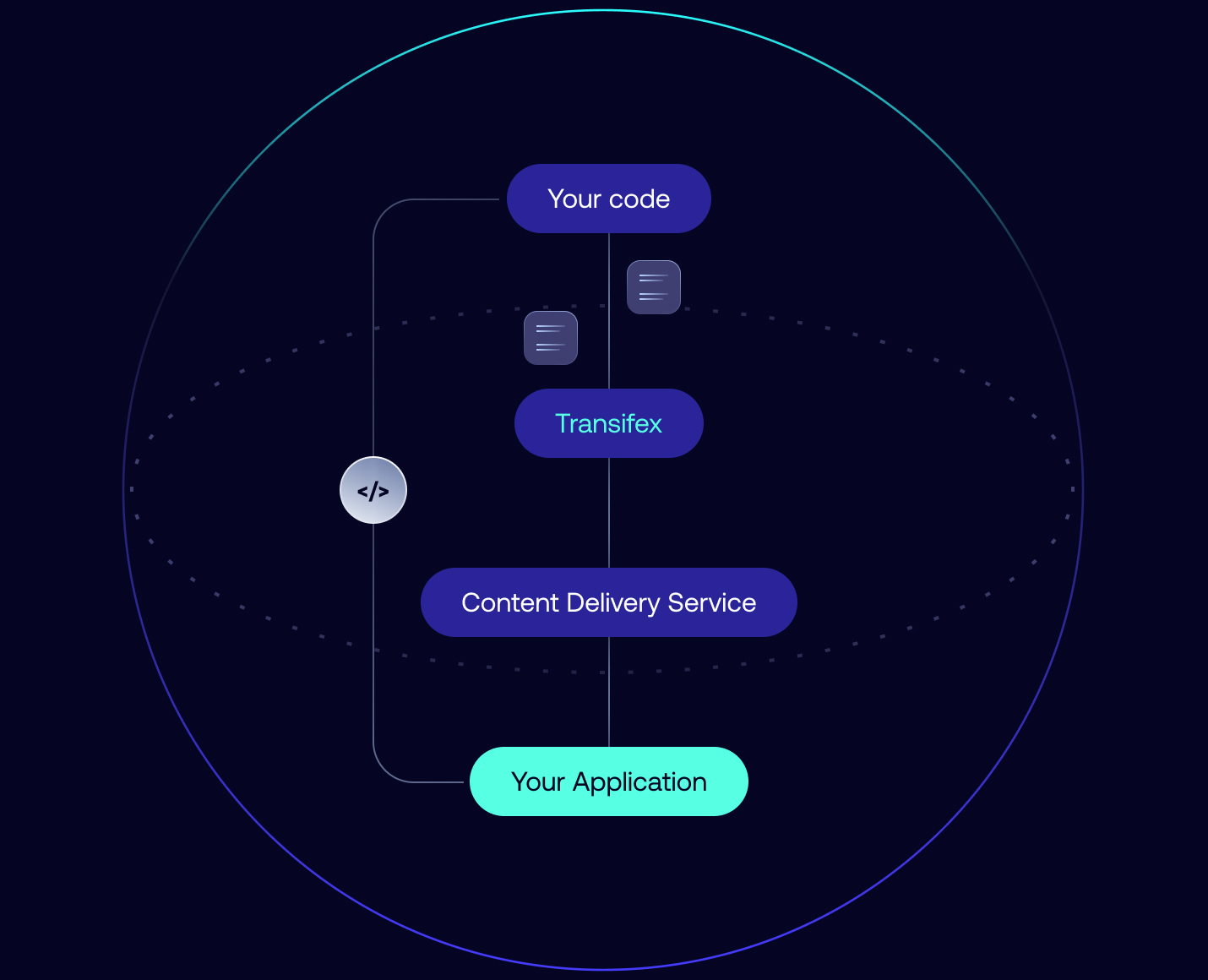
The result: a translation fix or a new language can go live independently of your release cycle. Localisation and development stop being a sequential handoff and start running in parallel.
Setting up an SDK-based localisation workflow
To run localisation in parallel with development, you need three things: a way to connect your codebase to your translation platform, a way to push strings as you write them, and a way to deliver completed translations back to the app without a new build.
Transifex Native is built around this model. It combines framework-specific SDKs, a CLI for pushing and pulling content, and a Content Delivery Service (CDS) that sits between the platform and your app — caching translations and serving them similarly to how a CDN works. The CDS can be hosted by Transifex or self-hosted on your own infrastructure — an option most localisation platforms don't offer, and one that matters for teams with data residency or compliance requirements.

Creating your project and connecting your codebase
You start by creating a Native project in Transifex, which generates a token and secret that authenticate the connection between your codebase and the platform.
On iOS, the SDK is added as a Swift package dependency in Xcode. Once initialised with your project token, it layers on top of iOS's existing localisation framework — your NSLocalizedString calls keep working as-is.
On Android, the SDK is added as a package dependency and initialised in your Application class with your source locale, target locales, and project token. It works on top of Android's standard string resource methods.
Both the iOS and Android SDKs are open source — they can be inspected, extended, or contributed to, and aren't a black box in your stack.
Pushing strings to the platform as you write them
With the SDK in place, use the Transifex CLI to send source strings to the platform.
iOS:
txios-cli push --token <token> --secret <secret> --project MyApp.xcodeproj Android:
transifex push -t <token> -s <secret> -m <app_module_name> Strings become available for translation the moment they're pushed. Multiple developers can push from their own branches in parallel, which matters when several features are in flight at once. The process integrates cleanly into an existing CI/CD pipeline — no translation files to manually create, export, or manage.
Integrating localisation into your CI/CD pipeline
The CLI commands for pushing and pulling strings aren't just for local development — they're designed to run in a pipeline. Adding localisation to your CI/CD workflow means strings are pushed to the platform automatically when code is merged, and translated content is pulled and bundled before a release build runs. No manual steps, no one remembering to export a file.
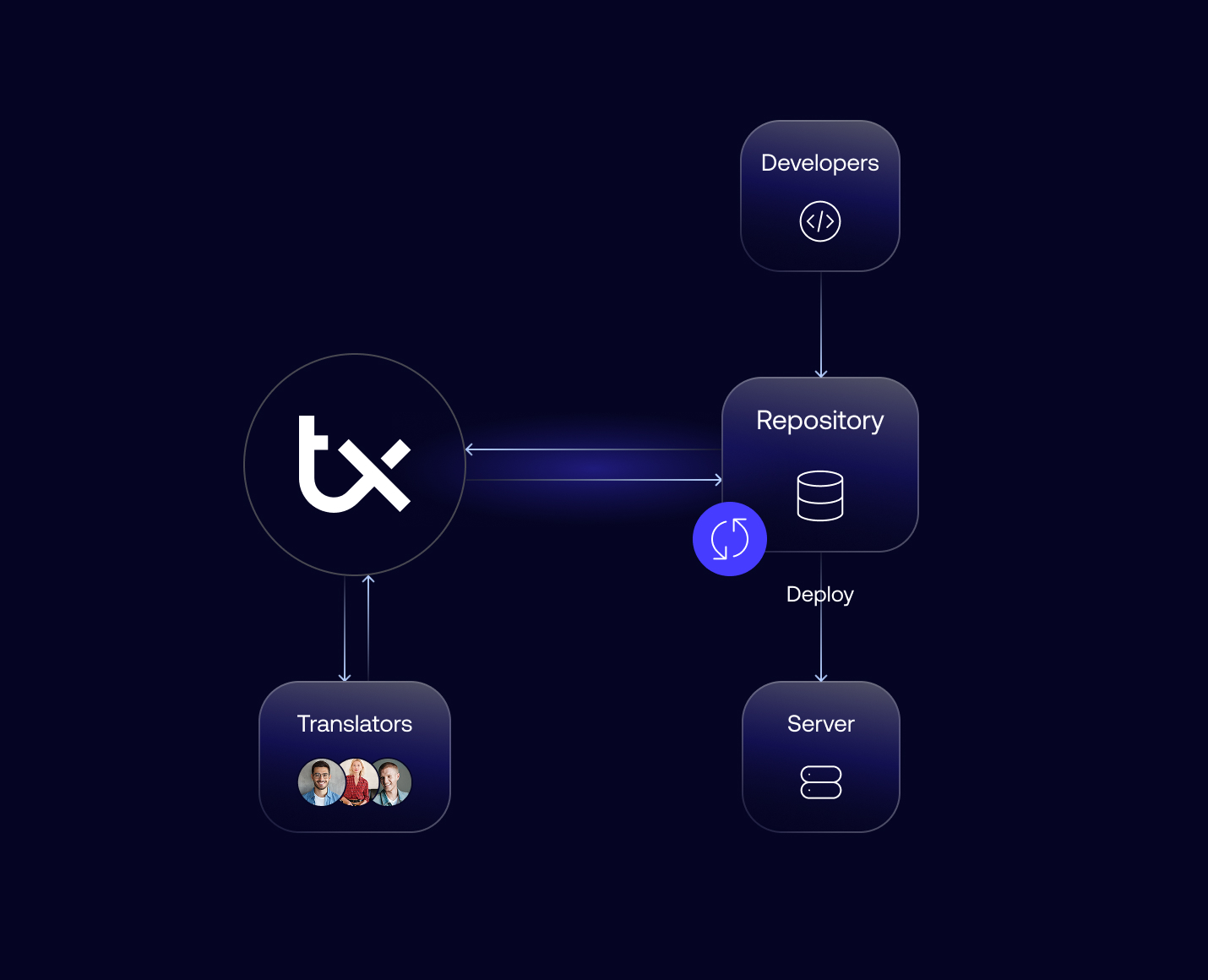
With GitHub Actions, a basic push workflow looks like this:
yaml
name: Push strings to Transifex on: push: branches: [main] jobs: push-strings: runs-on: ubuntu-latest steps: - uses: actions/checkout@v3 - name: Install Transifex CLI run: curl -o- https://raw.githubusercontent.com/transifex/cli/master/install.sh | bash - name: Push source strings run: transifex push -t ${{ secrets.TRANSIFEX_TOKEN }} -s ${{ secrets.TRANSIFEX_SECRET }} -m appThe same pattern works in GitLab CI and Bitbucket Pipelines — the CLI command is identical, only the pipeline syntax changes. The token and secret are stored as environment secrets in whichever platform you use, so credentials never appear in the codebase.
Every time a developer merges a feature branch, any new strings are automatically available for translation. Translators aren't waiting on a handoff.
How translation happens while development continues
Once strings are in the platform, translation can start immediately. Translation is typically handled in one of three ways:
Human translators — invite linguists directly into the platform, assign work, and track progress without leaving Transifex.
Machine translation — automated translation for high-volume or non-critical content. Integrations include Google Translate, DeepL, and Amazon Translate.
Human post-editing — MT or AI handles the first pass; human translators review and refine. This balances speed with quality and is the right default for most production apps.
Transifex AI uses your glossary, style guide, and past translations to generate context-aware output that reflects your brand voice. It also supports intelligent post-editing workflows — automatically scoring, routing, and publishing translations based on real-time quality signals. Strings that meet your quality threshold go live without waiting for manual review. Translators focus only on what needs attention.
Delivering translations to the app without a new build
The CDS delivers translations directly to the app. Call fetchTranslations() at an appropriate point in your app lifecycle — on launch, on returning to the foreground, or when connectivity is established — and the SDK pulls the latest translations from the cache.
For offline support and first-launch reliability, pre-populate the cache by bundling a txstrings.json file with your app before release.
iOS:
txios-cli pull --token <token> --translated-locales <locales> --output <directory> Android:
transifex pull -t <token> -m <app_module_name> -l <locale> Users on their first launch see translated content rather than falling back to the source language.
Once the app is live, any translation update goes through the CDS without touching your codebase or going through store review. You update the string in Transifex, and the next time a user opens the app, they get it.
How parallel workflows affect release velocity
The deeper shift is that development and localisation no longer wait on each other.
In a file-based workflow, localisation starts after a feature is built: strings are finalised, a file is exported, translators work on it, it comes back, gets integrated, then ships. Each step feeds the next.
With strings going to the platform as they're written — from a working branch, mid-feature — translators can start immediately. By the time the feature is ready to ship, the translations may already be done. On teams releasing frequently or managing many languages, this is where the time savings are most visible.
Keeping translations consistent as you scale
Consistency across languages doesn't happen automatically. It requires the right assets in place before translation starts.
Glossary
Defines terms that should always be translated the same way — product names, feature names, UI conventions. Visible to translators in the editor as they work.
Style guide. Sets tone and voice expectations per language — formality level, punctuation conventions, register. Gives both human translators and AI a clear brief.
Translation memory. Stores every approved translation and surfaces matches automatically when the same or similar string appears again. On apps with repetitive UI patterns — error messages, confirmation dialogs, navigation labels — this compounds over time.
Transifex AI uses all three together from the first pass. As your translation memory grows and glossary matures, more strings reach production-ready quality without manual review. The review burden decreases as you scale, not the opposite.
Mobile app localisation checklist
- [ ] All user-facing strings externalised into resource files
- [ ] No hardcoded date, time, currency, or number formatting
- [ ] Pluralisation handled via platform-native mechanism (
<plurals>/.stringsdict/.xcstrings) - [ ] Layouts use directional-neutral attributes (
start/end, leading/trailing) - [ ] RTL tested via pseudolanguage on simulator/emulator
- [ ] Pseudolocalisation run to catch layout expansion issues
- [ ] Character limits defined per string and communicated to translators
- [ ] Default resource file (
res/values/strings.xml) complete — no missing strings - [ ] Screenshots provided per string for translator context
- [ ] Glossary and style guide in place before translation starts
- [ ] Store listing localised per target market (name, description, keywords, screenshots)
- [ ] App Store keywords treated as fresh research per locale, not translated from English
- [ ] OTA delivery configured for post-launch translation updates
- [ ] Automated test verifying all locale-specific strings exist in the default file
- [ ] CI/CD integration — string push on commit or merge
Frequently asked questions
What's the difference between internationalisation and localisation? Internationalisation (i18n) is the engineering work of structuring your app so it can support multiple languages — externalising strings, handling locale-specific formatting, building flexible layouts. Localisation (l10n) is what happens after: translation, cultural adaptation, and market-specific adjustments. You can't localise effectively without internationalising first.
Can I update translations without submitting a new build? Yes, with an SDK-based delivery model. Using Transifex Native, translations are served over the air via a content delivery layer. When you update a string in the platform, users receive it the next time the app fetches translations — no new build, no store review. This is especially valuable for fixing translation errors quickly or shipping a new language without waiting for the next release.
How do I localise an iOS app? Externalise strings using NSLocalizedString (or SwiftUI's native localisation) into .strings files or .xcstrings String Catalogs (Xcode 15+). Handle pluralisation in .stringsdict. Use leading/trailing Auto Layout constraints for RTL support. From there, push strings to a translation platform via CLI for automated workflow integration.
How do I localise an Android app? Strings go in res/values/strings.xml for the default locale, with locale-specific overrides in res/values-[locale]/strings.xml. Use the <plurals> element for pluralisation. Add android:supportsRtl="true" to your manifest and use start/end layout attributes. Push strings to a translation platform via CLI for CI/CD integration.
What is pseudolocalisation and why does it matter? Pseudolocalisation replaces your source strings with synthetic variants that simulate how translated text will look — expanded length, accented characters, RTL direction. Running your app in a pseudolocalised state during development exposes layout and UI problems before real translations are produced, when fixing them is cheap.
How do I handle pluralisation across languages? Use your platform's native pluralisation mechanism — <plurals> on Android, .stringsdict or .xcstrings on iOS — rather than constructing plural strings in code. Provide translators with all plural forms required for each target language (the CLDR standard defines these per language), and use a translation platform that supports plural form editing per locale.
When should I start thinking about localisation? From the start of development. Retrofitting internationalisation into an app that wasn't built for it — refactoring hardcoded strings, restructuring layouts for RTL, adding pluralisation support — is significantly more expensive than building with it in mind from day one.
Getting started
Localisation done well is mostly invisible. Users in each market get an experience that feels built for them, and your team isn't running a separate process to make it happen — it's part of how the product ships.
Getting there requires the right foundation: an internationalised codebase, a workflow that keeps development and translation moving at the same time, and a delivery mechanism that isn't tied to your release cycle.
con
Read Also